Spectral Secrets (MISC)

This challenge involved examining an audio file for hidden content. The name "Spectral Secrets" is a major hint that we should look at the spectrogram of the audio file.

Understanding Spectrograms
A spectrogram is a visual representation of the spectrum of frequencies of a signal as it varies with time. In audio steganography, text or images can be hidden by modifying specific frequencies in a way that's not audible but becomes visible when viewing the spectrogram.
When investigating audio files in CTFs, it's always worth checking the spectrogram, as this is a common technique for hiding information that's not audible but can be seen when visualizing the frequency domain.
Analyzing the Audio File
To analyze the audio file, I used Audacity, a free, open-source audio software that can display spectrograms. After downloading the challenge file, I opened it in Audacity.
In Audacity, I followed these steps to view the spectrogram:
- Opened the audio file
- Clicked on the track name dropdown
- Selected "Spectrogram" view
- Adjusted the spectrogram settings to get a clearer view

Discovering the Hidden Flag
After switching to the spectrogram view, I immediately noticed a pattern of text hidden in the frequency display. This text was not audible when playing the audio file, but clearly visible in the spectrogram.
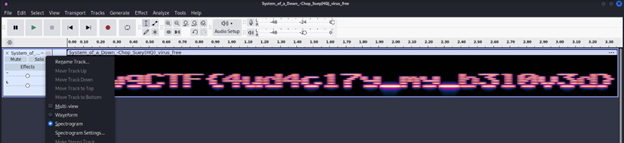
In the spectrogram, I could clearly see the text: "DawgCTF{4ud4c17y_my_b310v3d}". This is a clever wordplay on Audacity, the tool commonly used to view spectrograms.

Submitting this flag confirmed it was correct:
